Knowledge Graph
Your Documents Have Connections. Now You Can See Them.
Automatic knowledge graph construction reveals patterns that keyword search will never find.
THE PROBLEM
Vector Search Has a Blind Spot
Great at:
"What does document X say about topic Y?"
Terrible at:
- "What are the main themes across our knowledge base?"
- "How is Person A connected to Project B?"
- "What companies does this vendor work with?"
These are GLOBAL queries. Vector search only does LOCAL queries.
THE SOLUTION
The Solution: Knowledge Graph Reasoning
"We Build a Map of Your Knowledge"
Automatic Extraction
Every document is automatically analyzed during ingestion to extract:
Entities
People, companies, products, concepts
Relationships
works_for, located_in, related_to
Attributes
Descriptions, dates, values
See It In Action
For example, when "John" is mentioned in meeting notes, Courdx automatically connects that to "John Smith" in the org chart, his projects, his team, and any documents he authored — even if they never explicitly reference each other. No manual tagging, no folder structures, no metadata setup. The graph builds itself as your documents are ingested.
Community Detection
- Entities clustered into meaningful groups
- Each community gets an AI-generated summary
- Hierarchical structure from specific to general
- Enables answering "What are the main themes?"
Intelligent Routing
Questions automatically classified and routed:
Entity-centric search
"What did John say about Project X?"
Community-based search
"What are the main compliance risks?"
Both strategies combined
"How does our security compare to industry standards?"
USE CASES
Questions Only a Knowledge Graph Can Answer
Research
"What are the main themes in this literature?"
Legal
"Show all contracts connected to this vendor"
Sales
"How does this prospect relate to existing customers?"
HR
"What skills appear together in top performers?"
VISUAL EXPLORER
Explore Connections Visually
Our WebGL-powered graph visualization lets you explore your knowledge base interactively.
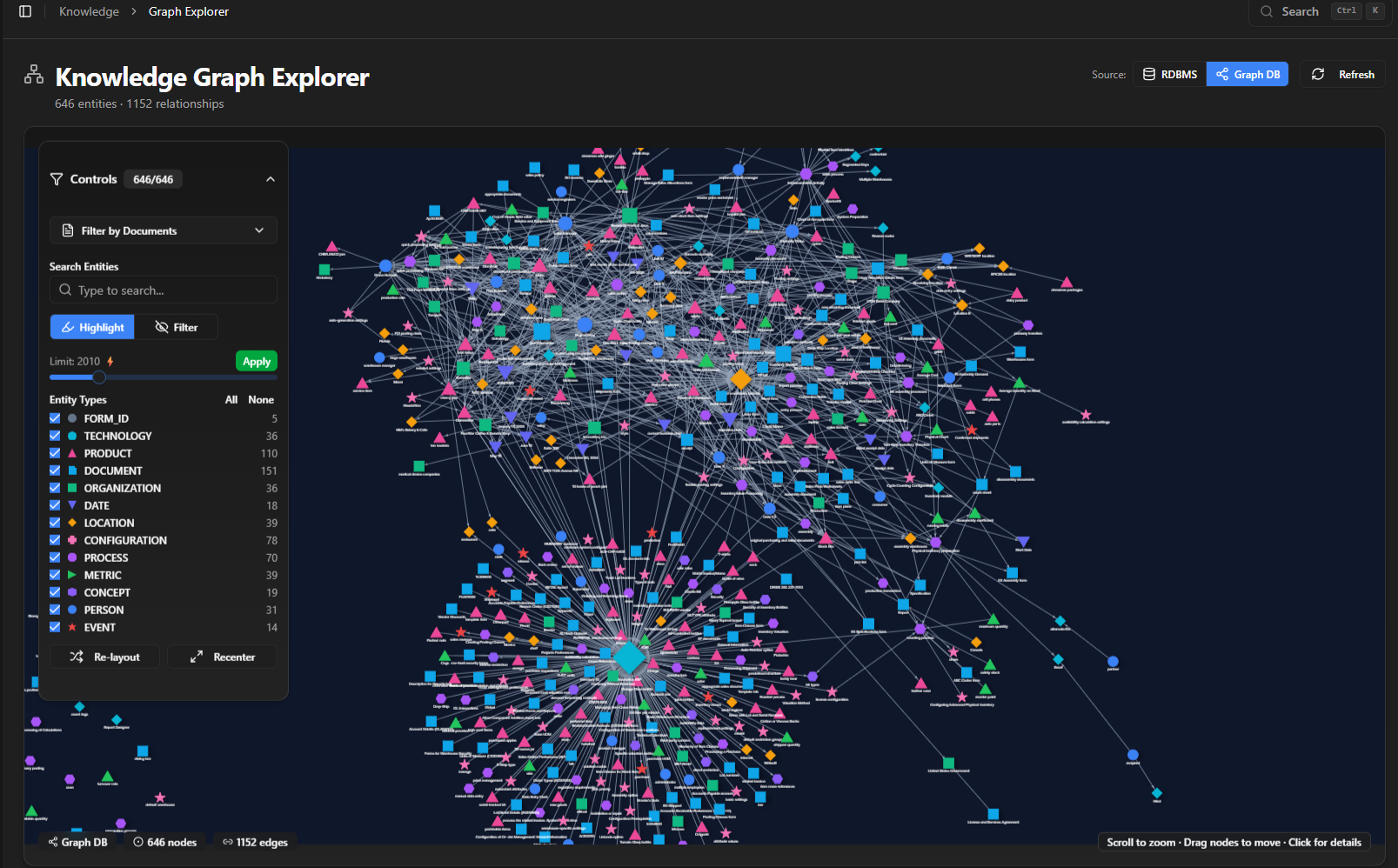
Live knowledge graph from enterprise deployment — entities and relationships extracted automatically
- Click any entity to see relationships
- Filter by entity type
- Search and highlight paths
- Zoom from overview to detail
See Your Knowledge Graph
Discover the hidden connections in your documents.